A customer places an order. The sales team checks availability. Purchasing needs to replenish stock. The warehouse receives new items. Accounting records the related financial transactions.
In a growing business, these activities happen continuously.
The challenge begins when every department uses a different spreadsheet or software application and information must be transferred manually between them.
Sales may have one version of the numbers. Inventory may have another. Accounting may spend additional time reconciling transactions before management can review performance.
An Enterprise Resource Planning (ERP) system is designed to help businesses manage these connected operations through an integrated software environment.
But ERP is more than a technical term.
Understanding how it works can help business owners decide whether they need a new system, improvements to existing software, or better integration between the tools they already use.
In this guide, EasyAI explains what ERP means, how ERP software works, its core modules, business benefits, implementation considerations, and how companies in Qatar can evaluate the right solution.
What Is ERP? Enterprise Resource Planning Explained
What Is ERP? Enterprise Resource Planning Explained
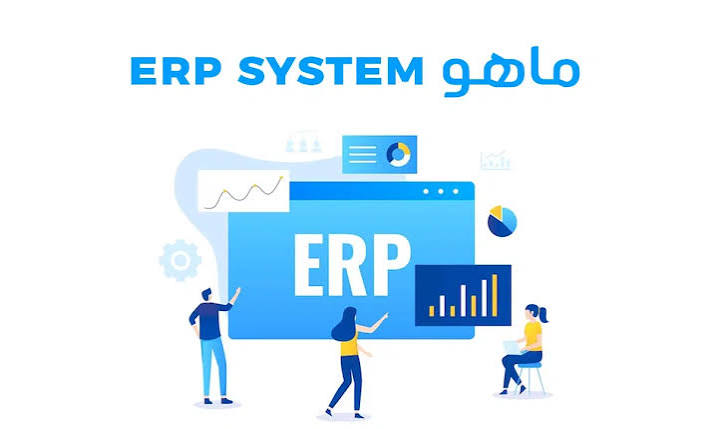
ERP stands for Enterprise Resource Planning.
It refers to software that helps organizations manage and connect essential business processes such as accounting, sales, purchasing, inventory, manufacturing, human resources, and project management.
Rather than keeping operational information in isolated systems, ERP provides a framework for managing related transactions and data.
For example, a purchasing transaction can connect supplier information, goods receiving, inventory records, and accounting documents.
A sales transaction may connect customer orders, stock movements, invoicing, and receivables.
The exact process depends on the ERP platform and its configuration.
The central idea is straightforward: business departments should be able to work with connected information instead of repeatedly recreating it.
What Does Enterprise Resource Planning Mean?
Business resources include more than money.
They can include inventory, raw materials, employees, equipment, budgets, production capacity, and time.
ERP helps organizations organize and monitor information related to these resources through defined workflows and reporting tools.
How Does an ERP System Work?
Consider a company that distributes equipment to customers.
A customer orders 20 units.
The sales team records the order and checks available inventory.
If stock is insufficient, the purchasing team may initiate a replenishment process.
When the supplier delivers the goods, the warehouse records the receipt, updating inventory according to the transaction.
The company can then continue with delivery, invoicing, and payment collection.
Instead of requiring every department to maintain an entirely separate record, the ERP connects the relevant documents and processes.
This integration can reduce repeated manual work and improve the consistency of operational information.
However, ERP does not automatically guarantee accurate data.
Employees still need to follow the correct procedures, and the system must be configured appropriately.
What Are the Main ERP Modules?
What Are the Main ERP Modules?
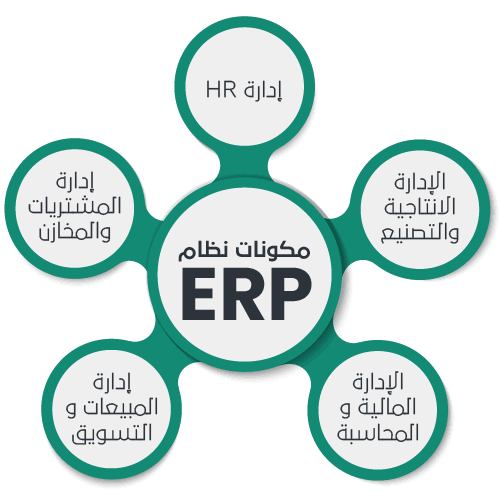
ERP platforms differ in scope, but several modules are commonly found in enterprise management systems.
Financial Management and Accounting
Accounting functionality may include the general ledger, accounts receivable, accounts payable, invoicing, payments, reconciliations, and financial reports.
These capabilities help businesses manage financial transactions and review their financial position.
Sales Management
Sales modules can support quotations, customer orders, invoices, returns, and related commercial processes.
When connected to inventory and accounting, they can provide a more complete view of sales activity.
Purchasing and Procurement
Purchasing functionality typically supports purchase requests or orders, goods receiving, supplier invoices, and returns.
Approval workflows and user permissions may also be available.
Inventory and Warehouse Management
Inventory modules help businesses monitor products, quantities, warehouses, stock transfers, and stock counts.
They are particularly relevant to companies managing multiple locations or complex product structures.
Manufacturing and Production
Manufacturing functionality can include Bills of Materials (BOMs), work orders, material consumption, and finished goods production.
These features are relevant to factories, food production businesses, and operations involving assembly or processing.
Human Resources and Payroll
Depending on the ERP platform and installed applications, HR functionality may include employee records, attendance, leave, and payroll.
Businesses should verify whether payroll functionality supports their applicable local requirements.
Project Management
Project functionality helps organizations track tasks, milestones, resources, and costs.
It can be useful for contracting businesses and service providers managing multiple projects.
Customer Relationship Management
CRM capabilities help manage leads, opportunities, and customer interactions.
CRM may be integrated into an ERP environment or connected as a separate application.
What Are the Benefits of ERP Software?
ERP can provide several operational advantages when it is implemented and used appropriately.
Less Duplicate Data Entry
Connected processes can reduce the need to enter the same information into multiple applications.
This may also reduce errors associated with manual re-entry.
Better Information Visibility
Management can access reports based on transactions recorded across departments.
The quality of those reports still depends on accurate and timely data entry.
More Consistent Workflows
ERP can support defined procedures, permissions, and approvals.
This helps businesses apply operational policies more consistently.
Improved Inventory Control
Inventory functionality provides tools for monitoring stock quantities and movements.
It can also support investigations into discrepancies, although physical counts and correct procedures remain important.
Better Cost Analysis
When purchasing, inventory, accounting, and projects are connected, businesses may be able to analyze costs in greater detail.
Support for Business Growth
A suitable ERP platform can help manage increasing transaction volumes, additional users, and more complex operations.
Scalability should still be evaluated based on the chosen platform and infrastructure.
If your sales, inventory, and accounting data are scattered across different systems, it may be time to rethink how your business operates. Speak with EasyAI to explore the right solution.
Contact: +974 5102 9761 | +974 5122 6442
ERP vs Accounting Software: What’s the Difference?
Accounting software primarily focuses on financial transactions and reporting.
ERP can include accounting while also connecting the operational processes that generate those transactions.
| Area | Accounting Software | ERP Software |
| Primary focus | Financial records | Financial and operational processes |
| Sales | Invoices and receivables | Sales workflows connected to other functions |
| Purchasing | Bills and payments | Procurement, receiving, and invoicing |
| Inventory | Varies by product | Can connect inventory with other modules |
| Manufacturing | Usually not the primary focus | May include production management |
| Reporting | Mainly financial | Financial and operational |
| Scalability | Product-dependent | Platform- and infrastructure-dependent |
ERP is not automatically necessary for every company.
A small business with straightforward requirements may be well served by accounting software.
ERP becomes more relevant when processes are interconnected and operational complexity increases.
ERP vs CRM vs POS
ERP, CRM, and POS are related but distinct categories.
ERP manages connected business operations and resources.
CRM focuses on customer relationships, sales opportunities, and customer interactions.
POS supports transactions at the point of sale, such as in restaurants and retail stores.
These systems can operate independently or be integrated.
For example, a restaurant POS may send sales information to a Back Office platform or ERP, depending on the technical integration and transaction design.
This means adopting ERP does not always require replacing every existing application.
Types of ERP Systems
ERP systems can be classified by hosting model and software licensing approach.
Cloud ERP
Cloud ERP is hosted on infrastructure accessed over a network.
It may reduce the need for locally managed servers, although security, backups, updates, and operational responsibilities depend on the provider and service agreement.
On-Premises ERP
On-premises ERP runs on infrastructure managed by the organization or its appointed provider.
It may suit businesses with particular infrastructure or control requirements, but it also requires suitable technical management.
Open-Source ERP
Open-source ERP provides source-code access under an open-source license.
It may offer customization flexibility, but implementation, hosting, maintenance, and support can still involve costs.
Commercial ERP
Commercial platforms may use subscription or licensing models.
Capabilities, customization options, and support terms vary by vendor.
The right choice depends on the company’s requirements, budget, integrations, and long-term operational needs.
What Is ERPNext?
ERPNext is an open-source ERP application built on the Frappe Framework.
It provides business management functionality across areas such as accounting, sales, purchasing, inventory, manufacturing, and projects.
ERPNext can be configured and customized for particular business requirements, subject to technical feasibility.
EasyAI provides ERPNext implementation and customization services in Qatar.
It is important to distinguish between ERP and ERPNext.
ERP is the broader category of enterprise resource planning software.
ERPNext is one specific product within that category.
When Does a Business Need ERP?
A business may benefit from evaluating ERP when several recurring challenges appear.
Information is spread across multiple applications and spreadsheets.
Departments repeatedly enter or reconcile the same data.
Management reporting takes too long.
Inventory becomes difficult to track across locations.
Approvals depend heavily on manual communication.
Existing software struggles to support additional branches or more complex operations.
However, these challenges do not always mean that the business must replace its entire technology environment.
Sometimes the appropriate solution is workflow improvement, customization, or integration.
A requirements assessment should come before a major implementation decision.
ERP Use Cases Across Industries
Restaurants and Cafés
Restaurant businesses may need to connect sales, purchasing, inventory, recipes, manufacturing, and central-kitchen operations.
Contracting and Construction
Contractors may require procurement, project costing, financial reporting, and workflows adapted to their project operations.
Real Estate
Real estate businesses may need agreement management, recurring invoicing, collections, and financial integration.
Manufacturing
Manufacturers can use ERP to organize raw materials, Bills of Materials, production activities, stock movements, and cost information.
Wholesale and Retail
Trading businesses may benefit from connected sales, purchasing, warehouses, branch transfers, and accounting.
The required modules and workflows should always be assessed against the company’s actual operations.
How to Implement ERP Successfully
Step 1: Understand the Business Requirements
Identify current workflows, recurring problems, departments, and expected outcomes.
Step 2: Define the Scope
Document the modules, functionality, integrations, customizations, and deliverables.
Step 3: Prepare Processes and Data
Review item records, customer and supplier information, units of measure, opening balances, and other relevant data.
Step 4: Configure and Customize
Set up the ERP environment and develop agreed customizations or integrations.
Step 5: Test Real Business Scenarios
Validate workflows such as purchasing, receiving, selling, and recording their financial effects.
Step 6: Train Users
Employees should understand the procedures relevant to their roles, not only the software interface.
Step 7: Go Live and Review
Begin live operations through an appropriate transition plan, then review issues, data, and workflows during the initial operating period.
Successful implementation requires cooperation between the provider and the client’s operational teams.
Why Do Some ERP Projects Struggle?
Common implementation challenges include unclear requirements, inconsistent data, excessive customization, insufficient testing, limited user involvement, and inadequate training.
Projects can also be affected by changing scope or unclear responsibilities.
These issues demonstrate why ERP should be treated as both a technology project and an operational improvement initiative.
How Much Does an ERP System Cost in Qatar?
ERP costs vary considerably.
A company implementing basic accounting and purchasing functionality will have different requirements from a multi-branch business needing manufacturing, POS integration, and custom reporting.
Important cost factors include:
- Modules and functional scope.
- Custom development and workflow changes.
- Integrations with external systems.
- Data preparation and migration.
- Hosting and infrastructure.
- Training and support.
- Applicable software licenses or subscriptions.
The most useful quotation is one based on a defined scope rather than a generic ERP price.
How to Choose the Right ERP System
How to Choose the Right ERP System
Begin with the business processes that matter most.
Determine whether accounting, purchasing, inventory, manufacturing, projects, or multi-branch management are the main priorities.
Then evaluate how well the system supports those requirements.
Consider customization, integration, reporting, permissions, infrastructure, and ongoing costs.
The implementation partner also matters.
Even suitable software requires careful configuration, data preparation, testing, and training.
ERP selection is therefore not simply a software purchasing decision.
It is a decision about how the business will manage information and operations.
How EasyAI Supports ERP Implementation in Qatar
At EasyAI, we begin by understanding the company’s workflows and existing systems.
We provide ERPNext implementation and customization, along with software development and integration services for business operations.
Depending on project requirements, work may involve module configuration, workflow customization, reports, integrations, data preparation, training, and support arrangements.
Our project experience includes work involving a six-branch restaurant business in Qatar, with an environment connecting ERPNext, custom POS, and Back Office requirements.
That experience reflects the importance of understanding how sales, purchasing, inventory, manufacturing, and users interact.
Not every business needs to replace all its software.
Sometimes improving the current environment is the more appropriate option.
Our focus is to help businesses evaluate and implement technology that supports their operations.
Is ERP Right for Your Business? Talk to EasyAI
If your company is struggling with disconnected information, inventory visibility, manual reporting, or growing operational complexity, ERP may be worth evaluating.
The right solution could involve ERPNext, improvements to existing software, or integrations between systems.
Book a consultation with EasyAI to discuss your business requirements and explore the right ERP approach before implementation.
Contact: +974 5102 9761 | +974 5122 6442
Frequently Asked Questions About ERP
What is ERP in simple terms?
ERP is software that helps businesses manage connected processes such as accounting, sales, purchasing, inventory, and manufacturing.
What does ERP stand for?
ERP stands for Enterprise Resource Planning.
Is ERP suitable for small businesses?
It can be, particularly when the business needs connected workflows. Simpler businesses may not require a full ERP platform.
Is ERP the same as accounting software?
No. Accounting may be one component of ERP, which can also include operational functions.
Can ERP integrate with POS?
Yes, where the platforms support the required integration and data exchange.
What is the difference between ERP and ERPNext?
ERP is a category of business software. ERPNext is a specific open-source ERP application.
Is ERPNext free?
ERPNext is open-source software, but implementation, hosting, customization, maintenance, and support may involve costs.
Does ERP replace all business applications?
Not necessarily. Some applications may remain in place and be integrated with the ERP.
How long does ERP implementation take?
It depends on project scope, data readiness, customization, integrations, testing, and training.
Can ERP generate financial reports?
Yes. ERP systems commonly provide accounting and financial reporting functions.
Does ERP require employee training?
Training is important for ensuring that employees understand the system and its operational workflows.
Can ERP be customized for different industries?
Many ERP platforms support customization. The extent depends on the product and technical requirements.
How can I start an ERP project in Qatar?
Begin by documenting business processes and challenges, then discuss the requirements with an implementation provider experienced in the relevant platform.